
Skip to content

Church guest follow-up software for the week after a first visit

Passport captures every first-time guest, sends the first text on Sunday and gives a named person on your team the follow-up within 48 hours. Then it shows you who came back.

  • 30-day free trial, no charge today
  • Cancel a monthly plan anytime
  • Most churches are live in under 30 minutes
A church volunteer smiles while calling a first-time guest, taking notes at a table in a bright room

What is church guest follow-up software?

Church guest follow-up software is a tool that records every first-time visitor, contacts them soon after their visit, gives a named person at the church the job of following up, and shows whether the guest came back and joined a group, class or ministry. It turns a stack of Sunday cards into a schedule someone owns.

A church management system keeps the records. Follow-up software runs the first weeks after someone visits: it decides who contacts each guest and when, and it shows you any guest who has slipped through. You can run it alongside the database you already have, such as Breeze ChMS or Planning Center.

Why does the week after a first visit matter so much?

Guests decide quickly: in a 2023 Lifeway Research survey of churchgoers who had switched churches, 71% decided to attend regularly within three visits. Meanwhile a guest fills out a card on Sunday, and by Tuesday it is in a stack on someone’s desk. Here is what else research on people choosing a church says about those first weeks.

Source: Lifeway Research, 2023

  • 79% say the welcome shaped their decision

    79% of church switchers say the way their current church welcomed visitors positively influenced their decision to attend regularly; 49% strongly agree.

    Source: Lifeway Research, 2023

  • 85% attended a service first

    85% of Americans who searched for a new congregation attended a worship service at one they were considering, and 69% talked with its members.

    Source: Pew Research Center, 2016

  • 21% were contacted by a welcoming team

    Only 21% of church switchers say a welcoming team contacted them when they visited their current church, down from 28% in 2006.

    Source: Lifeway Research, 2023

  • 80% use printed guest cards

    Most U.S. Protestant churches (80%) ask guests to fill out a printed card so they can follow up; only 38% offer an online form.

    Source: Lifeway Research, 2025

Each household that stays is people who belong, and on average $2,738 a year in giving. Put your own numbers into the guest retention ROI calculator, or read every sourced figure on the church visitor retention statistics page.

What does a good church visitor follow-up system do?

Six jobs, in order. Each one is worth doing with paper and a phone if that is what you have. Here is what good looks like, and how Passport does it.

  1. Capture every guest

    What good looks like

    Every first-time guest is recorded on the day they visit, with a name and a way to reach them, in one list everyone can see.

    How Passport does it

    The connection card, QR welcome card, Visit page and staff guest intake all put guests into the Guests hub.

  2. First contact the same day

    What good looks like

    A short, warm thank-you reaches the guest on Sunday, while the visit is still fresh.

    How Passport does it

    A Guest Journey sends the first text on the schedule you set, written in your church’s own words.

  3. A named person within 48 hours

    What good looks like

    One person, by name, owns the follow-up for each guest, with a due date the rest of the team can see.

    How Passport does it

    Every first-time guest gets a care assignment for a named person within 48 hours of the visit.

  4. A real conversation

    What good looks like

    Someone calls or texts, listens for what the guest is looking for, and writes it down for the next person.

    How Passport does it

    Replies land in a shared guest inbox, and the follow-up task holds the call and what was learned.

  5. Connection to a group, class or ministry

    What good looks like

    The guest is personally invited to one specific next step, and someone checks that they got there.

    How Passport does it

    Guest Journeys keep going until the guest is connected to a group, class or ministry.

  6. See who came back

    What good looks like

    The church knows who returned, who has been contacted, and who still needs a call.

    How Passport does it

    Attendance from Passport, Breeze or Planning Center marks each return, and retention reports count it.

What does guest follow-up look like in Passport?

One family’s first week, from the welcome card to the Sunday they came back.

  1. Sunday, 10:42 AM

    They scan the welcome card

    The Alvarez family fills in your connection card on a phone. Passport adds them to the Guests hub.

  2. Sunday, 1:15 PM

    A welcome text goes out

    Their Guest Journey sends a thank-you while lunch is still on the table. Nobody had to remember.

  3. Monday, 9:00 AM

    Maria gets the follow-up

    A care assignment lands with a named person on your team, inside 48 hours of the visit.

  4. Tuesday, 6:30 PM

    A real conversation

    Maria calls, hears they are looking for a kids’ ministry, and logs it in one tap.

  5. Thursday, 12:10 PM

    Ana texts back

    Her reply arrives in the guest inbox, where anyone on the follow-up team can answer it.

  6. The next Sunday

    They come back

    Attendance from Passport, Breeze or Planning Center marks the return, and your retention report counts it.

Names and times are examples. Text timing and who gets each assignment are set by your church.

The screens your follow-up team works from

Real Passport screens. Open the live demo to click through every one of them yourself.

Passport dashboard with this week’s new visitors, a Follow Up button and a care assignment for a first-time visitor
Who needs a call this week. New visitors and each person’s care assignments, on the first screen your team opens.
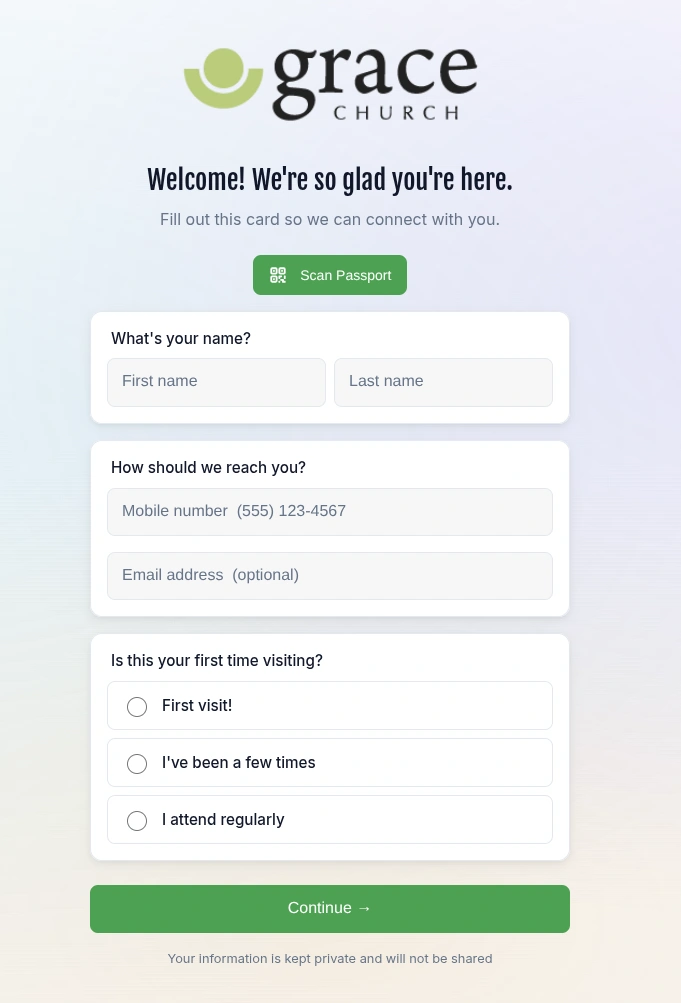
Passport digital connection card asking a guest’s name, mobile number and whether it is their first visit
The connection card. Three questions on a phone, from the QR welcome card.
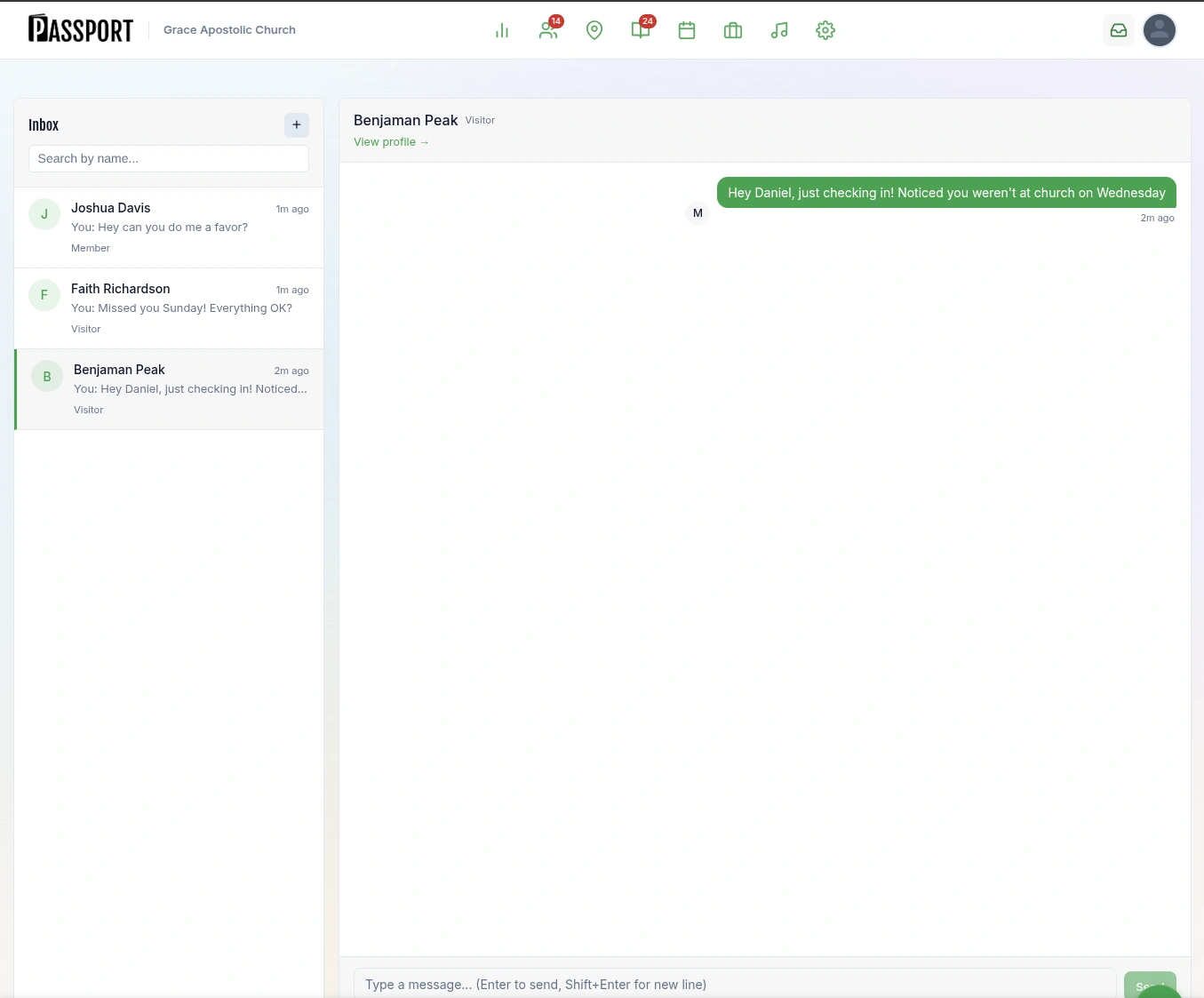
Passport guest inbox with text conversations with visitors and members
The guest inbox. Every reply in one shared place your volunteers can answer.
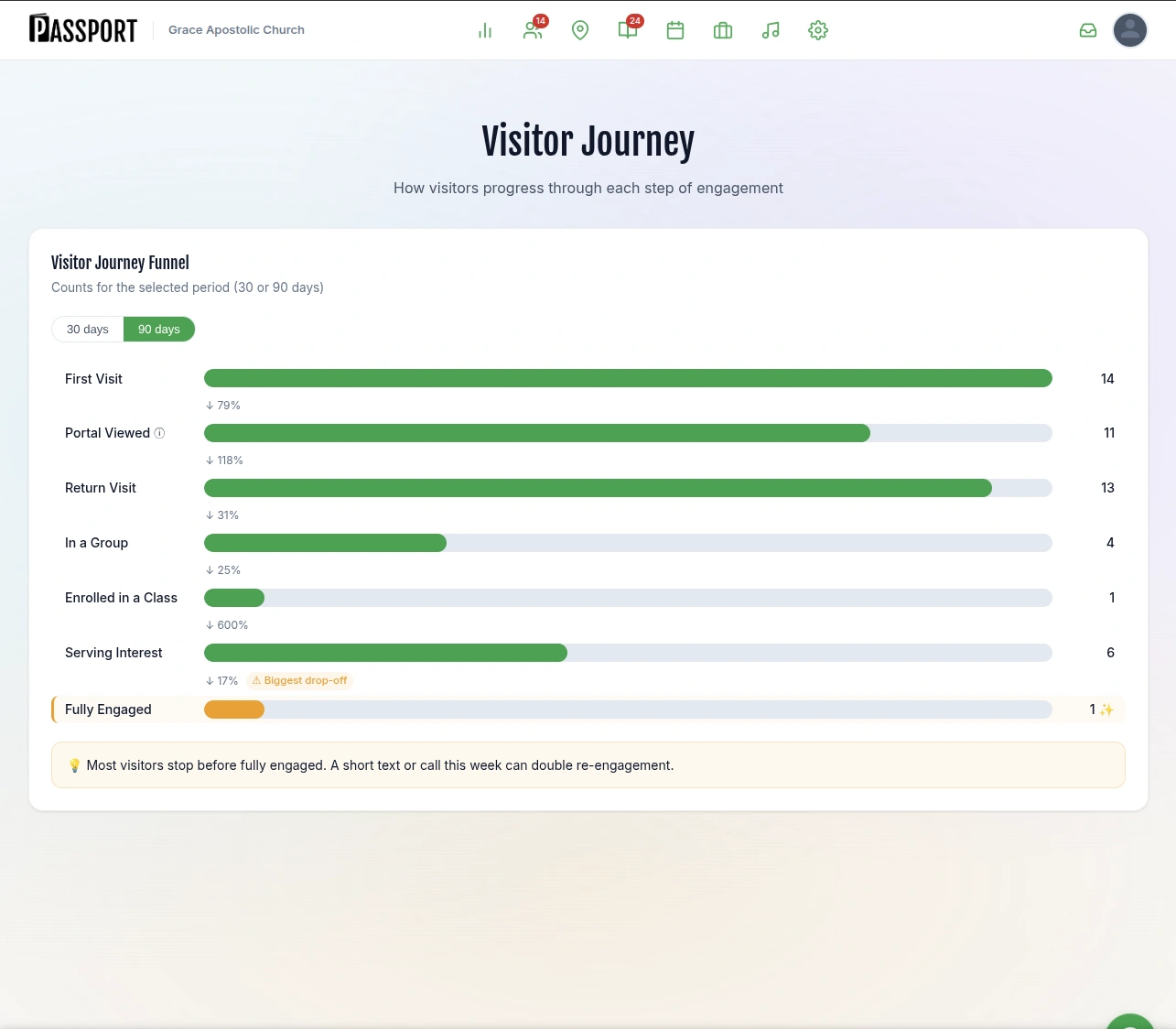
Passport visitor journey report counting first visits, return visits, group and class enrollment and serving interest over 90 days
Where guests stop. First visits, returns and connections in one report, with the biggest drop-off marked.

Open the live demo

A first-time guest follow-up checklist for any church

Use it this Sunday, with paper cards and your own phone. It works whether or not you ever use Passport.

In Passport, each line is a step you set once in a Guest Journey, and the timing runs itself. Everything that needs a person still goes to a person.

Want the wording too? Borrow from these church visitor follow-up email templates.

  1. Sunday, during the service

    Collect a connection card from every guest

    Ask for a name, a mobile number and whether it is their first visit. Keep it short: a QR code on the seat back or a card at the welcome desk.

  2. Sunday afternoon

    Send a two-line thank-you text

    Sign it with a real name and ask one easy question they can answer from the car.

  3. Monday morning

    Give each guest to one named person

    Put the name and a due date where the rest of the team can see them.

  4. Within 48 hours

    Call or text personally

    Listen for what brought them: a move, children, a friend, a hard season. Write it down.

  5. Midweek

    Answer every reply the same day

    Whoever answers should see what the guest has already told you, so nobody asks twice.

  6. Before next Sunday

    Offer one specific next step

    A time, a place and a person to meet: coffee at 9:30 before the service, ask for Maria.

  7. The next Sunday

    Greet them by name and record the return

    A second visit is the moment to introduce them to one more person.

  8. Weeks two to six

    Keep a light touch until they are connected

    Check in every week or two until they are in a group, class or ministry, or tell you they have found a church home.

Does guest follow-up software work with Breeze or Planning Center?

Passport does. Your staff keep the system they know, and Companion, the follow-up plan, is $49 a month. Most churches are live in under 30 minutes.

Breeze

  • Import your people, tags, events and attendance history from Breeze.
  • While the connection is set to keep Breeze updated, each new guest Passport captures is added to Breeze, matched to anyone already there so nobody is entered twice.
  • If you take attendance in Breeze, Passport reads it from the Breeze events you match to your services, so it knows when a guest comes back.
Passport for Breeze churches

Planning Center

  • Import your people, households, groups, events, check-ins and services from Planning Center.
  • If you check people in with Planning Center Check-Ins, Passport reads the check-ins for the events you match to your services, so it knows when a guest comes back. First-time guests checked in there start their follow-up in Passport.
Passport for Planning Center churches

Not on either? Passport runs on its own too. Compare plans on the Passport pricing page

Questions about church guest follow-up

A greeter high-fives a child as a family returns to church the next Sunday

Make sure every guest hears from a real person this week.

Start Companion free for 30 days, or open the live demo and follow one guest from the welcome card to their second Sunday.

  • 30-day free trial, no charge today
  • Cancel a monthly plan anytime
  • Most churches are live in under 30 minutes